Mostrando entradas con la etiqueta Autodesk. Mostrar todas las entradas

martes, 13 de marzo de 2012

#73 - Autodesk Sustanibility Workshop

El otro día buscando un vídeo que me recomendaron encontré algo que me pareció muy interesante y de gran utilidad. Un Workshop de sostenibilidad sobre los productos de la mano de Autodesk. Esta casa me está sorprendiendo cada día más. No solo hace programas y deja a los estudiantes que se descarguen TODOS gratuitamente (Download page). Sino que también está concienciada con el medio ambiente. Da lecciones sobre la vida del producto, sus componentes, como hacer mejores diseños y como utilizar softwares para conseguir esto.  Os dejamos un vídeo sobre la vida de un producto y como hacer que un ordenador portátil pueda ser reciclado:


The other day  I was looking for a video that a friden recommended me, I found something  very very very interesting and useful. A Sustainability Workshop on the products by Autodesk. This house is surprising me every day. Not only do they make programs and allow students to download them ALL free ( Download page). But also it is environmentally friendly. They give lessons about the life of the product, its components, how to make better designs and how to use software to achieve this. We leave you a video about the life of the product and how to make a laptop be recycled:

Link: http://sustainabilityworkshop.autodesk.com/

domingo, 11 de marzo de 2012

#71 - Ingeniería inversa 2

Tras explicar uno de los métodos de ingeniería inversa en el post #69 hoy os traemos otro método llevado a cabo por los chicos de Autodesk. Esta vez simplemente necesitas tu objeto que quieres pasar a CAD y una cámara de fotos. Sacas fotos alrededor del objeto, las introduces en el ordenador y listo. El mismo software te recrea el objeto punto a punto. Echarle un vistazo, parece muy sencillo:

After explaining one of the methods of reverse engineering in post #69, today we bring you another method carried out by Autodesk. This time, you just need your object, the one you want to scan to pass it to CAD, and a camera. Take pictures around the object, pass them to the computer and go. The same software recreates the object point by point. Take a look, it seems very simple:


lunes, 6 de febrero de 2012

#37 - Impresora

No se si recordaran la entrada que pusimos hace una semana sobre como hacer unos bocetos de una impresora y un deportivo ( #26 - Bocetos ). Pues bien, ayer me armé de paciencia y poquito a poco le di color y consistencia a la impresora. De nuevo he vuelto a utilizar el Autodesk SketchBook Designer 2012. Muy sencillo de utilizar y la verdad es que los resultados que se obtienen no son nada pero que nada malos. Os animo a que lo utilicéis y nos mandeis vuestros bocetos.

Do you remember the post we published a week ago about making some sketches of a printer and a sports car ( #26 - Bocetos )? Well, yesterday I armed myself with patience and little by little I gave color to the printer. Again I'm back using Autodesk SketchBook Designer 2012. Very easy to use and the truth is that the results obtained are amazing. I encourage you to use it and to send us your sketches.


Si teneis alguna duda,cuestion o sugerencia no dudeis en mandarnos un mail a 1boceto1dia@gmail.com o a @1boceto1dia

domingo, 29 de enero de 2012

#29 - Lo prometido es deuda

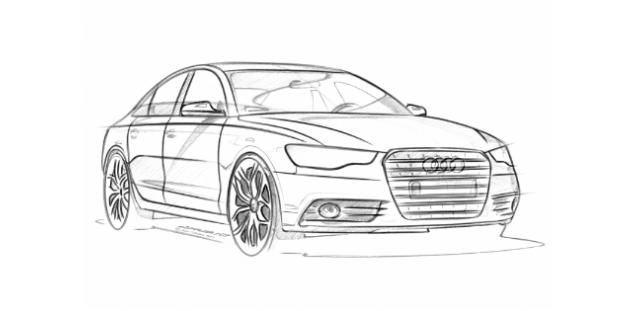
Como dije en el día #4 - Autodesk Sketchbook Designer tenía que terminar el coche que empecé probando el Designer. La verdad es que le he cogido mucho gusto a este programa. Fácil de utilizar y da muy buenos resultados.

As I said in the day #4 - Autodesk Sketchbook Designer I had to finish the car I started drawing in the Designer. The truth is that I love to this program. Easy to use and it gives very good results.


Os dejo todo el proceso y el boceto final / I leave the whole process and the final sketch:


martes, 24 de enero de 2012

#24 - Drawing with Sketchbook Designer 2012

Hoy os traigo un boceto que hice hace un par de semanas en el Sketchbook Designer 2012. Es algo sencillo que voy a explicar paso a paso. El dibujo es un joven descendiendo una carretera en su longboard.

Today I am going to show you a sketch I drew weeks ago with Sketchbook Designer 2012. It is something very easy and I am going to explain it step by step. The sketch is about a young longboarder doing downhill.

Primero hacemos unos trazos para hacernos la idea de las proporciones y perspectiva. / First of all we draw the main lines.


Más tarde hacemos las lineas mediante vectores. Esta opción nos da bastantes posibilidades de modificación ya que solo tenemos que añadir puntos y moverlos para cambiar una línea. / Then we make the final lines with vectors. It is easy to change because the only thing we need to do it is add more points on the vector.


El siguiente paso es ver hacer desaparecer la capa de los primeros trazos./ We made disappear the main lines.


A continuación coloreamos y hacemos algún que otro detalle. / With a new layer we painted it.


Después hacemos las sombras en una capa diferente y ya tenemos nuestro joven patinador. Solo nos falta un lugar. / The next step is to give  it some shadows. The last thing we need is a place or background.


En este paso tenemos varias opciones: coger una foto y ponerla atrás o dibujar nuestra propia fotografía. Nos quedamos con la segunda pero haremos algo sencillo. Dos lineas para delimitar la zona de la carretera. / In this step we have two options: to put a photo as background or draw it. We decided to do the second one. The two lines are the shore of the road.


Algo de color... / More colour...


Y finalmente algunos detalles como hierba o marcas de derrape en el suelo. / Finally some details of the road and of the grass.


miércoles, 4 de enero de 2012

#4 - Autodesk SketchBook Designer

No solo hablaremos en este blog de diseños sino también de programas y técnicas que hacen posibles a un diseñador transformar sus ideas en algo real.

Para empezar hablaré del programa SketchBook Designer de Autodesk. Este programa podríamos decir que es  más completo que el SketchBook Pro, también de Autodesk. Este último solo tiene la posibilidad de dibujar lineas y trazos, en cambio, el Designer, trabaja con vectores, lo que hace más sencillo pasar de un boceto a algo final. Podemos decir que se asemeja al  Adobe Illustrator a la hora de trabajar con vectores. Eso sí el Designer es mucho más intuitivo. Apenas necesitas una media hora para saber manejarlo. Desde la página de Autodesk puedes descargarte bastantes texturas para poder trabajar con ellas.

A continuación os dejo unas pruebas que hice con el programa partiendo de una foto de internet. La verdad es que con tiempo y paciencia los resultados pueden ser verdaderamente buenos.


Not only we going talk about  design and 3D animation in this blog but also about the  programs and techniques that enablea designer to transform their ideas into something real.


To start we are going to talk about Autodesk SketchBook Designer. We could say that this program it's more complete than SketchBook Pro, also from Autodesk . This only has the ability to draw lines and strokes, however, the Designer, works with vectors, which makes it easier to go from a sketch to a final drawing. We can say that is similar to Adobe Illustrator when you work with vectors. But the Designer is more intuitive. Just you need half an hour to know to  how handle it. From the Autodesk page you can download many textures to work with them.


I did some tests with the program with a photo from internet. The truth is that with time and patience the results can be really good.


Esta fue la foto seleccionada / This was the selected picture:


A continuación trabajé con los vectores/ Working with vectors:


Este es el resultado de los trazos realizados/ The result:


Y tras darle algo de color este fue el resultado final/ We coloured it a little bit:


Prometo acabarlo y definir hasta el más minimo detalle. Más adelante, acabado.
It is not finished, with time I will do it. I promise you!


P.D. Si eres estudiante puedes descargarte más de 30 programas de esta casa totalmente gratis, solo necesitas registrarte ¡y listo! Más de una empresa debería aprender de ellos... Os dejo el link: http://students.autodesk.com/

P.S. If you are student and you want to download more than 30 programs from Autodesk you can enter here, register yourself and get them free. http://students.autodesk.com/